
Agent card
Everything most builds need, in the order you need it. The other pages go deeper, and the full documentation holds all of them in one file.
Commands
facet --doc f.facet build @screen.json --preview s.png   # build, then read every warning
facet --doc f.facet source Screen                        # a layer, in the language
facet --doc f.facet build @screen.json --sync            # change in place
facet --doc f.facet modify Card '{"fill": "@paper"}'     # one or two values
facet --doc f.facet tree Screen                          # ids, sizes, places
facet --doc f.facet inspect 42                           # every property of one layer
facet --doc f.facet shot Screen -o s.png --scale 2       # render any layer
facet --doc f.facet undo                                 # each call is one undo step
facet --doc f.facet close                                # save and stop the host
--doc and the path are two arguments. A file the app has open is edited live in the app; add --headless after the path for a host of your own. @file.json reads a file; inline JSON works too.
A build call
A node, a list of nodes, or {"kit": {...}, "nodes": [...]}. Send the kit once per file; it is saved with the file and every later call names it.
{
  "kit": {
    "font": "Inter 15/22",
    "colors": {
      "ink": "#1A1423",
      "paper": "#FBF7F0",
      "rose": "#D9485F",
      "mute": "#6B6470"
    },
    "type": {"title": "Inter 22/28 700", "cap": "Inter 12/16 600 +0.4 caps"},
    "parts": {
      "chip": {
        "params": {"label": "", "tone": "@rose"},
        "node": {
          "row": [{"text": "{label}", "color": "{tone}"}],
          "padding": [2, 8],
          "cornerRadius": 8,
          "fill": "{tone}/12%"
        }
      }
    }
  },
  "nodes": [
    {
      "name": "Card",
      "width": 360,
      "padding": 16,
      "gap": 8,
      "fill": "@paper",
      "color": "@ink",
      "cornerRadius": 16,
      "column": [
        {"title": "Today"},
        {
          "row": [
            {"cap": "Raag Yaman"},
            {"space": "fill"},
            {"chip": "Evening"}
          ],
          "width": "fill",
          "align": "center"
        },
        {
          "text": "Long text wraps at the card's width and takes the height of its lines.",
          "width": "fill",
          "color": "@mute"
        },
        {"icon": "lucide:clock", "size": 16, "color": "@mute"}
      ]
    }
  ]
}
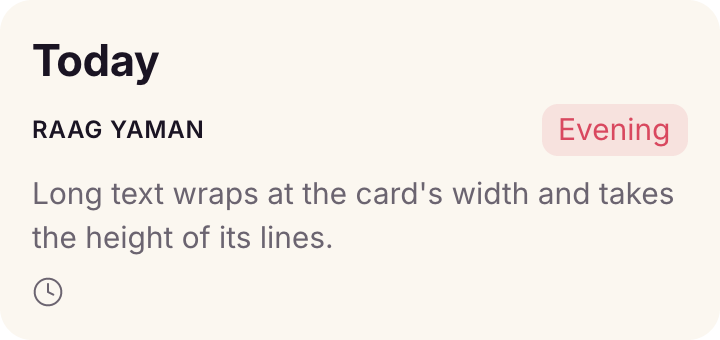
A kit and a card in one call. Every later call names @ink, title and chip without sending them again.
- Strings are texts. Containers pass
font,styleandcolordown to every text inside. - Kit colors are variables:
@ink, a tint@ink/40%, one value per mode with"modes": ["Light", "Dark"]and"mode": "Dark"on a layer. - Type presets are text styles:
{"title": "Today"}is a text intitle;"style": "cap"sets a container's default. - Parts take parameters:
{"chip": "Evening"}(first parameter) or{"chip": {"label": "Late", "tone": "@mute"}}.{param}alone takes the value as it is (a node, a list); inside longer text it is text. Parts use parts and pass their parameters on:{"avatar": {"initials": "{initials}"}}insidemember. Achildrenparameter takes the children written at the use ("{children}"). A list parameter defaulting to[], written alone among children ({"row": [{"text": "{who}"}, {"space": "fill"}, "{badges}"]}), adds nothing when left out and its nodes when given:{"member": {"who": "Ben", "badges": [{"chip": "Blocked"}]}}. - Names: a key that is not a language key is a preset, then a part, then a component. Keys win, so never name a preset or part
name,text,size,rowor any other key. A preset and a part cannot share a name.{"kit": {"parts": {"chip": null}}}removes one. - Font shorthand:
"Family Size/Line Weight"plusitalic, tracking+0.4or-2%, a casecaps. Weights are 100 to 900 in hundreds, orlight,medium,semibold,boldand the rest."17/26"keeps the family;"600"changes only the weight. Any Google Font downloads on first use. Change a preset in the kit and every text in it follows at once.
Layout
| Write | For |
|---|---|
{"row": [...]}, {"column": [...]} | auto layout; gap, padding (number, [v, h], [t, r, b, l]), align (cross: start, center, end, stretch), justify (start, center, end, space-between) |
{"grid": [...], "columns": 2} | rows of columns ([120, "fill"] sizes them) |
{"stack": [...]} | children overlap, centered; place each with at |
{"ring": [...], "r": 80} | children around a circle |
"width", "height" | a number, "fill" (the room the flow leaves), "hug" (default for containers); "size": 40 or [w, h] |
{"space": "fill"}, {"space": 12} | push siblings apart, or a fixed gap |
"at" | [x, y], [x, y, "center"], "bottom right", ["top right", -8, 8] (x right, y down), {"angle": 90, "r": 60}; takes the layer out of the flow |
"grow": 1 | take the leftover room along the flow |
Never compute positions: at with a place word, an anchor or an angle does it.
Look
fill (a color, "none", or a gradient {"linear": ["@rose", "@ink"], "angle": 160}), "$image": "photo:latte art" or a path for a picture, stroke and strokeWidth, cornerRadius (number or [tl, tr, br, bl]), opacity, effects ({"type": "drop-shadow", "x": 0, "y": 4, "blur": 12, "color": "#0000001A"}), overflow: "hidden", rotation. Texts: text, font, style, color, textAlign, maxLines: 1 (one line with an ellipsis), "type": "paragraph" with "runs": ["Due ", {"chip": "Fri"}, " at noon."] for chips inside a sentence.
{"icon": "lucide:bell", "size": 20, "color": "@mute"}: any Iconify set; each name becomes a component in an Icons frame, every use an instance. {"draw": [{"circle": [20, 20, 18], "stroke": "@rose", "weight": 3}], "size": 40} draws shapes (circle, ellipse, rect, line, poly, arc, path).
Repeat
{"each": ["Mon", "Tue", "Wed"], "do": {"chip": "{.}"}}: {.} the item, {field} a field of an object item, {i} its index, {#} its number. {"each": 5, "do": ...} repeats a count.
Components
{
  "nodes": [
    {
      "set": "Plan",
      "props": {"Price": "$0", "Note": "Billed monthly"},
      "variants": {"Tier": ["Free", "Pro"]},
      "template": {
        "name": "Plan",
        "width": 240,
        "padding": 16,
        "gap": 6,
        "fill": "#FFFFFF",
        "column": [
          {"title": "{Tier} plan"},
          {"text": "{Price}", "name": "Price"},
          {"text": "{Note}", "name": "Note", "width": "fill"},
          {"chip": "Popular", "only": "Pro"}
        ]
      },
      "x": 0,
      "y": 0
    },
    {
      "name": "Plans",
      "x": 0,
      "y": 260,
      "gap": 12,
      "row": [
        {"Plan": {"Tier": "Free"}},
        {
          "Plan": {"Tier": "Pro", "Note": "Billed yearly"},
          "name": "Pro card"
        }
      ]
    }
  ]
}
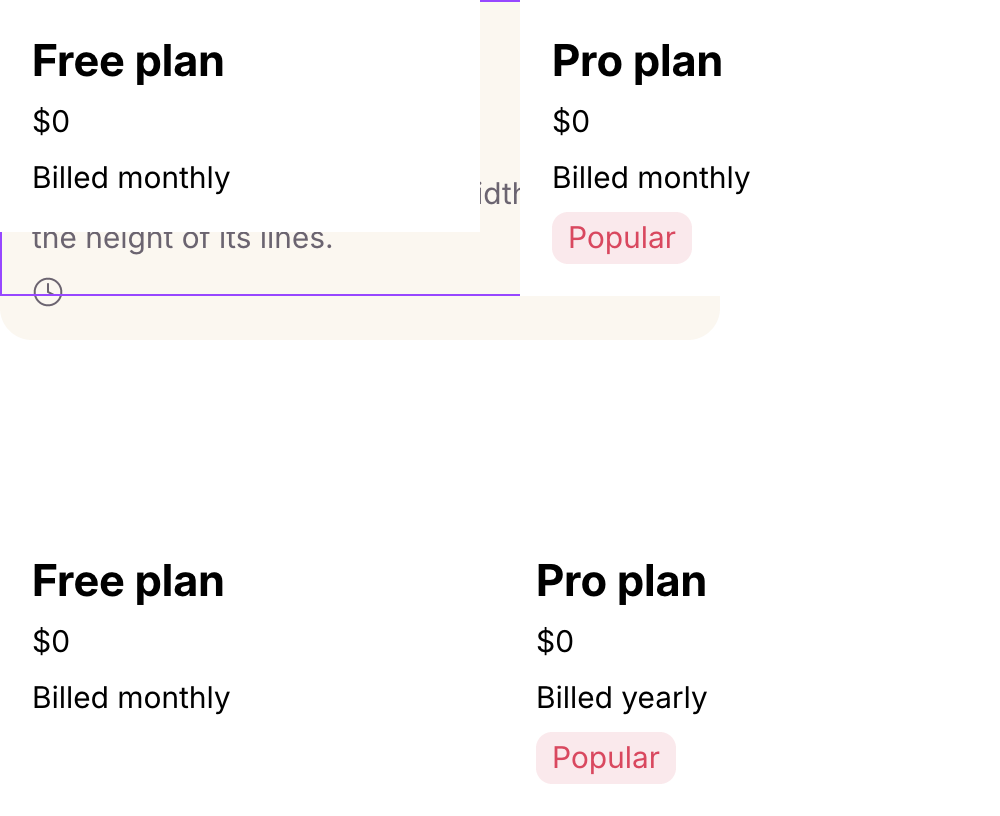
A set with a property per text, a variant property shown in a text, a layer only one variant holds, and two instances in the same call.
"{Prop}"binds a text to a property;"visible": "{Show}"binds visibility to a boolean one."{Tier} plan"names a variant property, so each variant shows its own value.onlykeeps a layer to some variants. A variant's map changes it:{"Tier": {"Free": {}, "Pro": {"fill": "#F3EFF7", "props": {"Price": "$12"}}}}.- A prop every variant sets for itself cannot be set by instances; the build warns.
- Give exposed texts
"width": "fill"(or a number) so longer values wrap rather than widen the component. - Instances:
{"Plan": {"Tier": "Pro", "Note": "Billed yearly"}, "name": "Pro card"}. Variant property keys choose the variant; the rest set properties. One call can hold the set and the screen that uses it. - Behavior on a set (
"behavior": {"start", "states", "axes", "plays", "targets"}) is stored as a feature named after the set (plan);facet chart planchecks it. See Behavior.
Changing what is there
| Change | Do |
|---|---|
| a value or two | modify NODE '{...}'; $nodes reaches named descendants: {"$nodes": {"Title": {"text": "Tue"}}} |
| a tree | edit the JSON you built it from, then build --sync: matched layers keep ids and instances; the reply counts what changed |
| a component set | build @set.json --replace: instances follow to the new variants and keep what they set |
| add one layer | build @row.json --parent ID appends it last; it takes the font and color the parent's texts share |
Name the layers you will change, or give repeated ones a key: sync matches by key or name, and same-named siblings in order. source prints a layer in the language with parts expanded; for a screen built from parts, keep editing your own JSON.
Checks
Every write verifies itself and reports, by layer, what did not happen: NOT_APPLIED, INPUT_IGNORED (a key not read, with the nearest one), LAYOUT_OVERFLOW, LAYOUT_OCCLUDED, TEXT_TRUNCATED, FONT_SUBSTITUTED, TOKEN_FALLBACK. Fix each one; the app shows them as badges. State what must hold instead of looking: "expect": {"lines": 1}, {"fits": true}, {"noOverlap": true}, {"width": {"max": 320}}; a miss is EXPECT_FAILED.
Look at the --preview PNG when the result matters visually. It renders the top-level layers the call built or synced, whole, not the page.
Traps
- Frames have no fill until you give one;
"fill": "none"removes one (nullis not a value). "fill"width needs a row, column or grid parent; a top-level layer gets a number.- A text in a stack or with
atkeeps its own width; give it awidthto wrap. - Overlapping top-level frames hide each other: put component sets to the side (
"x": 1400). "♈︎"draws a symbol as text; without U+FE0E some symbols draw as color emoji.