
Layout
Containers do the placing. You say how things flow and how they size; Facet does the arithmetic.
{
  "name": "Session",
  "font": "Inter 15/22",
  "width": 340,
  "padding": 20,
  "gap": 16,
  "fill": "#FFFFFF",
  "cornerRadius": 16,
  "column": [
    {
      "row": [
        {"text": "Riyaz session", "font": "17/22 700"},
        {"space": "fill"},
        {"text": "40 min", "color": "#6F6879"}
      ],
      "width": "fill",
      "align": "center"
    },
    {
      "row": [
        {
          "each": ["Sa", "Re", "Ga", "Ma", "Pa", "Dha", "Ni"],
          "do": {
            "row": [{"text": "{.}", "font": "13/16 600"}],
            "padding": [6, 10],
            "cornerRadius": 8,
            "fill": "#F3EFF7"
          }
        }
      ],
      "gap": 6,
      "wrap": true,
      "width": "fill"
    },
    {
      "row": [
        {"text": "Skip"},
        {
          "row": [{"text": "Start", "color": "#FFFFFF", "font": "15/20 700"}],
          "padding": [10, 20],
          "cornerRadius": 12,
          "fill": "#1A1423"
        }
      ],
      "gap": 16,
      "justify": "end",
      "align": "center",
      "width": "fill"
    }
  ]
}
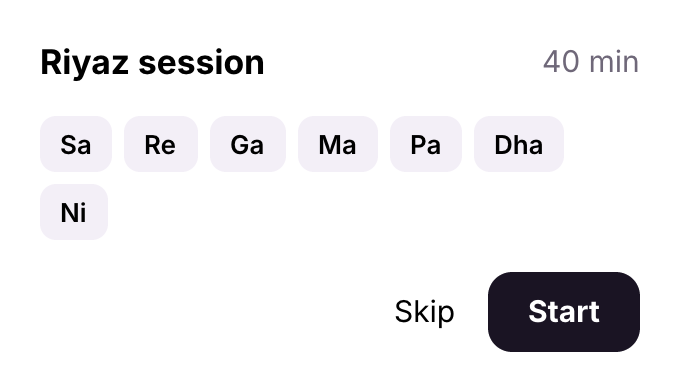
Three rows in a column. The first pushes 40 min right with a space that fills; the second wraps its chips, made with each; the third ends at the right with justify.
Flow keys
| Key | Forms | What it does |
|---|---|---|
gap | number, {"row", "column"}, "auto" | space between children; "auto" spreads them |
padding | number, [v, h], [top, right, bottom, left] | room inside the edge |
align | start, center, end, stretch | across the flow |
justify | start, center, end, space-between | along the flow (needs room) |
wrap | true | a row breaks into lines |
columns | number or tracks | a grid's columns |
Sizes
width and height take a number, "fill" (the room the parent's flow leaves) or "hug" (the content; the default for containers). size is both at once: a number, or [width, height].
A text with "width": "fill" wraps at the width its row or column gives it and takes the height of its lines; when the parent resizes, the text measures its lines again. "maxLines": 1 keeps it to one line with an ellipsis.
Space
{"space": 12} is a fixed gap in a row or column; {"space": "fill"} takes the free room, so whatever follows is pushed to the end.
Stacks
In a stack the children overlap. Each is centered unless it says otherwise with at, and the stack takes the size of its largest child.
{
  "name": "Avatar",
  "stack": [
    {
      "type": "ellipse",
      "size": 72,
      "fill": {
        "linear": ["#F29F05", "#D9485F"],
        "angle": 135
      }
    },
    {
      "text": "AK",
      "font": "Inter 24/28 700",
      "color": "#FFFFFF"
    },
    {
      "row": [
        {
          "text": "3",
          "font": "Inter 11/14 700",
          "color": "#FFFFFF"
        }
      ],
      "padding": [2, 6],
      "cornerRadius": 10,
      "fill": "#1A1423",
      "at": ["top right", -2, 2]
    }
  ]
}

An avatar: a gradient circle, initials centered on it, and a badge pinned to the top right corner.
Placing a layer: at
| Form | Places the layer |
|---|---|
[x, y] | with its top left corner at x, y |
[x, y, "center"] | with that point of itself (any place word) at x, y |
"bottom right" | in its parent by words: top, bottom, left, right, center, or two of them |
["bottom right", -16, -16] | by words, then moved by an offset (x to the right, y down, so -16 lifts it) |
{"angle": 90, "r": 80} | its center at that angle (degrees clockwise from the top) and distance from the parent's center |
In a row or column, at takes the layer out of the flow. Places pin the layer with constraints, so it keeps its place when the parent changes size.
Rings
A ring places its children around a circle of radius r, the first at start degrees (clockwise from the top), the rest evenly after it. A child may set its own angle.
{
  "name": "Clock",
  "stack": [
    {
      "type": "ellipse",
      "size": 220,
      "fill": "#F6F1EA",
      "stroke": "#1A142322"
    },
    {
      "ring": [
        {
          "each": 12,
          "do": {
            "text": "{#}",
            "font": "Inter 15/20 600",
            "color": "#1A1423"
          }
        }
      ],
      "r": 88,
      "start": 30
    },
    {
      "type": "ellipse",
      "size": 8,
      "fill": "#D9485F"
    }
  ]
}
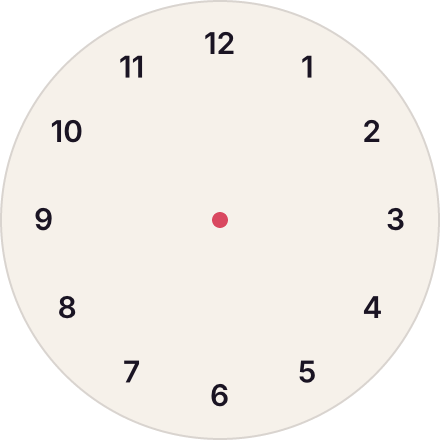
A clock face: twelve numbers from each on a ring starting at 30°, over a circle and a center dot, all in one stack.
Rotation
rotation turns a layer. In a row or column, a rotated layer keeps its own size and the flow makes room for its turned box.